
Tips On Buying Expired Domains
Click Here!
The first question a customer asks us is "How do I know which domain to buy?" There are so many scammy domains out there with high domain authority, which people have purchased for large amounts of money, only to find out that the domain was worthless.

1. Domain Age

Search engines prefer older domains since older domains are
more trustworthy. If the expired domain has not been dropped, it could retain
its age in the eyes of the search engines.
There are three "ages" that we display at DomCop.
- The
domain age from the WhoIs details. This basically counts from when the
domain was last registered. If a domain drops this number is often reset
- The
domain age from Wayback Archive. This counts the age from the first date
that the Wayback Archive crawled the website. If a domain did not have a
website, then this age might be much smaller than the WhoIs age
- The
website age from Wayback Archive. This counts the age of the last website
that was put on the domain. This is very useful number to know whether the
domain was regularly used.
Tip#1: Look for domains that are a few years older,
since it generally takes a while to amass enough authority, but don't fret if
the domain is not decades old.
2. Moz Metrics

Domain Authority (DA) is a metric between 0 and 100 that
predicts how well a website will perform in SERPs. DA can be used to compare
one domain against another. Page Authority (PA) is a metric that denotes the
chance of a specific page to rank in the SERPs. This is similar to the DA for
the domain - however it is a metric for the home page of the website. In an
ideal situation these two values should be very similar to each other.
DA/PA tend to be very popular metrics to gauge the value of
a domain. Unfortunately they are also extremely easy to manipulate. For some
reason, the other Moz metrics like Moz Rank and Trust Rank that are equally
good, have not found popularity with domainers.
Tip#2: Look for domains with a DA greater than 30.
Good domains tend to have at least that much.
3. Majestic Metrics

Trust Flow and Citation Flow have gained in popularity over
the last few years. While the Citation Flow is a measure like Page Rank and is
very easy to manipulate, the Trust Flow is a much tougher metric to manipulate
and has therefore become the default metric that is looked at first.
However, an even better metric that is harder to manipulate
is theratio between the Trust Flow and Citation Flow.
Most real domains
will have a TF/CF of slightly more than 1, while scammy domains have a ratio
much below 1. At DomCop this is the first number we look at, followed by the
Trust Flow.
Another really great metric provided by Majestic is the Topical
Trust Flow Category. This shows information about the niche that the back links
to the domain are from. Real domains tend to have back links from only one
top-level niche, while scammy domains have back links from different niches.
Tip#3: It is virtually impossible to manipulate the
combination of TF/CF ratio, Topical Categories and Trust Flow. With these three
numbers you can filter out most of the fake domains.
4. SEMrush Metrics
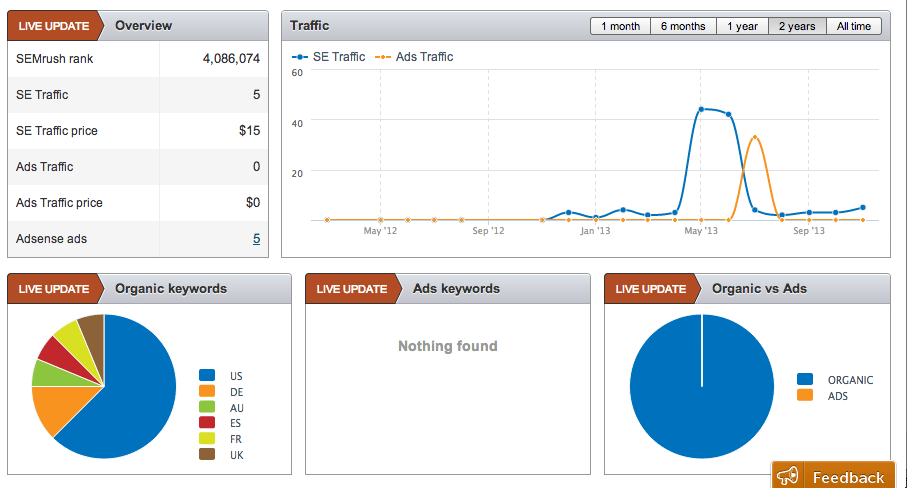
SEMrush provides SERP data for domains. This data essentially
tells you if the domain currently ranks for any keywords and is a good
estimator of the traffic you can expect from it. They offer the number of
keywords, monthly organic traffic volume and cost (based on keyword cpc and
volume)
Tip#4: The cost of traffic definitely helps justify
the value of the domain. However, run a few
keyword queries on Google to check
up if the SEMrush data is accurate.
5. SimilarWeb Metrics

Similar Web provides metrics for domain traffic and its rank
compared to other domains in the world, and in its niche. While the traffic
numbers might be a little off, it is a great way to compare between two
domains.
Tip#5: At DomCop, we prefer Similar Web Rank to Alexa
Rank in comparing between various domains.
6. Compete Metrics
Compete provides the approximate number of U.S. visitors to
the top million web sites. They compute this data directly from ISPs and
application service providers.
Tip#6: If you are looking for US based traffic the
Compete traffic data is worth looking at.
7. Alexa Metrics

Alexa maintains ranking data on all websites in the world.
The ranking algorithm is based on the total amount of traffic over the last
three months. They take data from a sample population and build the rankings
off that.
The rankings are not accurate enough as the sample
population is biased (data is taken mostly from those with the toolbar
installed). Also they can be easily manipulated by increasing the number of
visits to a domain after installing the toolbar. However, since Alexa rankings
have been there for a long time, they are quite popular among users.
Tip#7: Do not take the ranking and traffic seriously.
The ranking is a nice number to have, but not something to solely base your
purchase price on.
8. Back Link Data

Back links determine the equity passed to the domain and
therefore checking the back links to a domain is paramount in determining its
true value. However mere back link counts are not enough. Many domains will
have loads of back links that will disappear soon after you purchase them. The
trick is to find out which back links look like they will stay once the domain
has been purchased.
You can check the back links from Google, Moz, Majestic and
Ah refs. Google would obviously be our first choice. However, Google does not
show very accurate data on the back links. Sometimes it may show no links at
all. Therefore, although you ought give higher priority to the links you find
through the Google link operator, you should also check the back links from
Moz, Majestic and Ah refs. Ideally you should do a check using all three.
To see the value of the back link you should check the
following:
Does the link really exist?
You need to visit
the webpage that links to the domain and view the html source code
(Right click
-> View Source/View Page Source). Search for the link in the html code. If
you are unable to find the html link or the link is a JavaScript link, then you
should ignore this link and the rest of the steps.
Follow v/s No Follow

- We need to check if the link allows the link equity to pass through to the domain. If the link has a rel="nofollow" attribute, then this will not contribute to the link equity of the domain. It is still good to have the link - but this link should not be considered in the link equity calculation ahead.
Contextual Link

- Is the link surrounded by many links or by text? If the link is surrounded by a lot of other links (like a blog roll) then it's possible that entire set of links have been posted there in order to simply increase the link equity of the various domains. If the link is surrounded by text and is part of an article then the chances are that this link is genuine - which means that it will probably still exist six months after you have purchased the domain.
OutBound Links (OBL)

- Check the total number of OBL on the page. A very large OBL would mean that the PR juice that would flow would be a very small fraction of the domain PR. Additionally, search engines categorize pages with 100 or more OBL as back link farms.
Website Category

- Check whether the website
seems to be part of the same category as the domain. If the domain seems like a
blog about computers and the link is from a page about golf, this link may not
be valuable.
Tip#8: This step is the most intensive step of the
lot. Therefore, keep it as the last step after you have filtered the list based
on other metrics.
9. Google Penalties

One important check to make is whether Google has indexed
any pages from the domain. While some domains (namely in GoDaddy auctions) will
have a single page indexed, you should be wary of domains that have zero pages
indexed. This may be due to a manual or algorithmic penalty on the domain due
to black hat seo tactics. It’s also possible that the domain expired a long
time ago and the site has been completely de-indexed from Google.
Tip#9: If a domain is de-indexed, and there are no
clear indications of black hat seo, you could register it and put up a single
page website. Wait for a few weeks to see if it gets indexed. If the site does
not get indexed within a few weeks, do not spend any more effort on it.
10. Domain industry/sector

Most often people buy expired domains for a specific
industry or sector. It is therefore useful to know what kind of website existed
on the domain before you purchase it. It could be a site that does not fit into
the category or industry that you want. The best way to check this is to go to
the WayBack Machine and
check the different versions of the domain since it was first online. Also
check the Topical Categories and see whether the links to the domain are from
the same niche as shown on the Wayback machine
Tip#10: Google gives contextual links more weight age.
If you are buying an expired domain for linking to your money site, then
definitely look for a domain from the same sector/industry
11. Social Stats

We do not know how much social sharing affects SEO and
domain rankings. However, if a domain has been shared across multiple networks
it might be a sign of legitimacy for the search engines. Of course, don't get
carried away by a domain that has a very large social count number, as these
are extremely easy to fake.
Tip#11: Not all social networks are created equal. If
your website is image heavy then Pinterest shares would be beneficial, if it’s
business oriented then LinkedIn and so on.


No comments:
Post a Comment